University of Baltimore
Merrick School of Business
INSS 453/753 - Internet and Network Security

Mini-project 3: testing security of Linux/UNIX.
All mini-projects are due on Mondays by 11 PM.
Go to the MISLAB. Select Ubuntu Linux in the virtual machine the machine corresponding to your group number. Log in your group machine using inss753xx as your username and password. Each group has only one account in the machine.
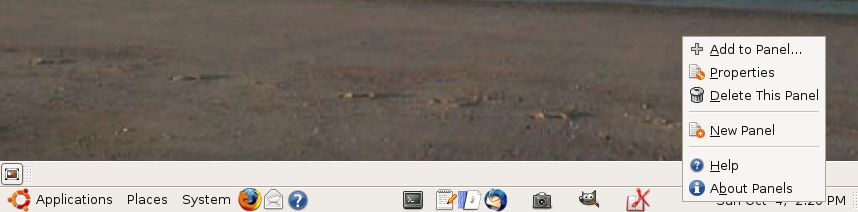
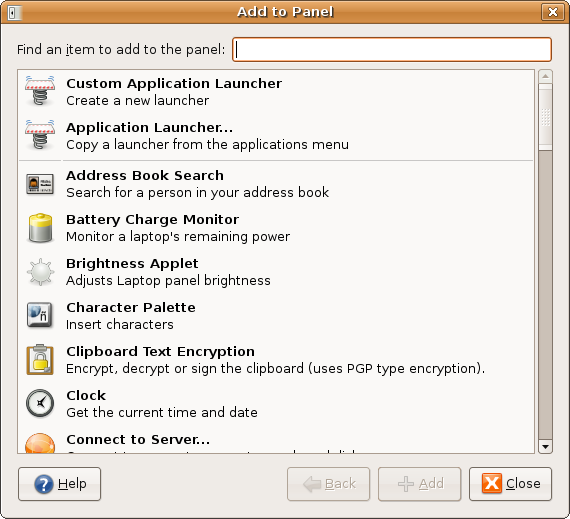
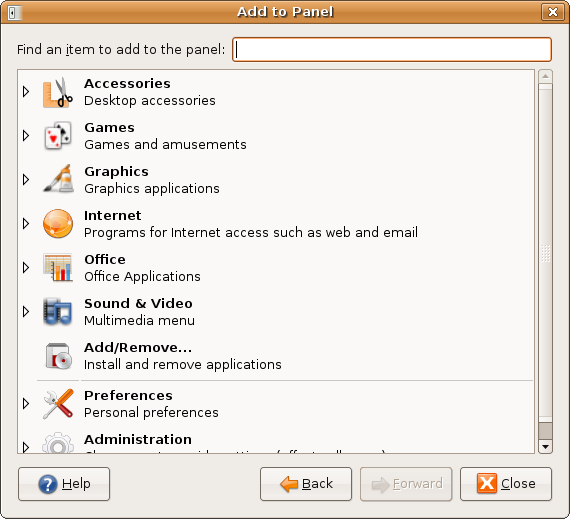
I suggest that you add to the main panel the tools that you may use frequently, such as terminal, gedit, screenshot, gftp, gimp. To do so click on the main panel, select add to panel, double-click on Application Launcher, and select from Accessories, Internet, Graphics, etc.
- Open a terminal window using the Gnome toolbar clicking on its symbol and change the password for the group account. Type passwd and the process will start.
- select an organization your group does not know much about (different from mini-project 1) and use the open search tools discussed in class and obtain basic information: Web page, location, basic financial numbers, etc. (Do not probe the organization, just collect information using Web search tools.
- For the same organization find who is its registrar, then do organizational, domain and network queries. You should find their IP block(s), network administrator, authoritative DNS, etc.(Again only use whois, not a direct probe to their sites).
- Again, for the same organization do DNS interrogation (zone transfer, e-mail server, and network reconnaissance). Hint: see this part of last class meeting.
- Install nmap and namapfe: sudo apt-get install nmap and then sudo apt-get install nmapfe .
- Start nmapfe (always use sudo)and target the MISLab IP block (local, not public). Use the first three quads followed by numbers ranging from 0 to 77 (assume this to be the MISLab IP block). Using nmap, do pingsweep, portscan (TCP and UDP) and OS detection. Capture the results using screenshot (a screen capture program installed by default in GNOME). You can see and edit the images with gimp (also a default Ubuntu graphical application).
- Check to see if the DNS server in your machine is vulnerable to the NXT validation buffer overflow problem. As root type ifconfig and find the IP number of your machine. Then type dig @ipnumberofmachine version.bind chaos txt See textbook pages 250-251 on how to read the results.
- Download and install John The Ripper. Use it to see if you can crack the password file in your system. It may take some time do run.
- Use rpcinfo to enumerate the rpc services which are running in a local machine. Use host to find an e-mail server in well known organization and finger to find who is connected to the mail server (it may not work if finger service is disabled in the mail server machine).
- You will use Ethereal as root in graphical mode to do this item. You will need to install it. Use sudo apt-get install ethereal. You will notice that the name was changed to wireshark due to trademark issues. Open a terminal and type wireshark. A graphical application will open, select Capture, options and click on capture. Open gFTP and connect to home.ubalt.edu, using your username and password in the UB PC network. Use as your username cis\ubxxxx. Change to the directory students/ubxxxxx (your username). Click on Stop, then File Save as. See what was captured by the sniffer and include the file and your comments in the report.
- Find what files are set to run with SUID and what files are writable by the world in your machine. Hint: See these examples for SUID and Writable files.
- Read this article in the Linux Administrator's Guide and explain how PAM and shadow passwords work, and why are they important in Linux/UNIX security.
Submitting the report
- Open Firefox in Linux, and post your group project report in the Mini-project 3 entry of the Assignments folder of one of the group members in WebTycho.
- Use screenshot to capture some of the screens you saw as result of the above assignment items. Include the images in the final report.
- You should submit just one file per group in MS Word format. Use OpenOffice to write your report and save it in word format.
This page is maintained by Al Bento who can be reached at abento@ubalt.edu
This page was last updated on October 3, 2009. Although we will attempt to keep this information accurate, we can not guarantee the accuracy of the information provided.