University of Baltimore
Merrick School of Business
INSS 453/753 - Internet and Network Security

Mini-project 4: testing network and wireless devices.
All mini-projects are due on Mondays by 11 PM.
Go to the MISLAB and log in Windows or Linux, as needed, like you did in prior mini-projects, then prepare a report including the following:
- Show me how you could setup a VPN connection from Windows. You do not need to complete it, just go through the initial steps.
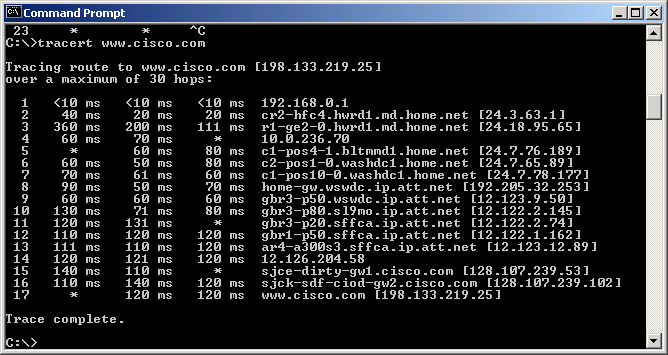
- Select a well known organization and use traceroute to find a border router, as seen in class.
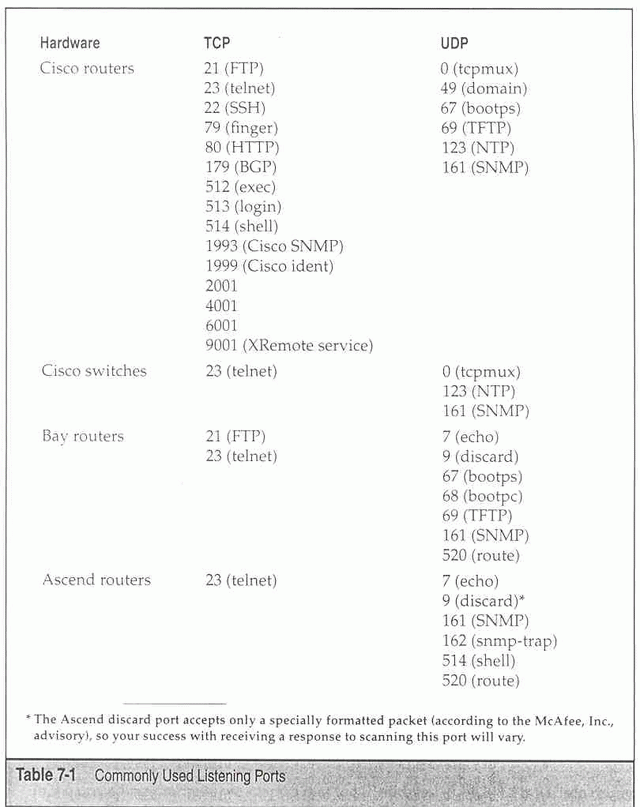
- Use SuperScan and WUPS seen previously or Nmap (in Linux) to scan ports belonging to routers. Hint: Use or adapt my file routers.txt to use with SuperScan (rename the file to routers.lst) or Nmap. Consult the table in page 398 of the textbook and try to identify the brand of the router.
- Using Nmap and other Windows tools identify the Operating system running in the router. Go to the company Web site and locate a manual for the OS you found (e.g, for the in class example - IOS 12.2.1 you can see its page here).
- Read the documentation for the OS you found and explain how it can be accessed remotely with telnet, if possible. Telnet to the router and, using the database of passwords, try to login, capture the image even if you are denied login (fail password). In the remote possibility you succeed, capture the image, and try to issue a simple command to list the configuration file (see book and OS documentation), and, of course, capture the image with the list of the configuration file.
- If you have a laptop with a wireless card install NetStumbler and use it at UB to identify some APs you can find. (If you don't see if you can borrow one temporarily).
- Explain the difference between WEP, EAP, and WAP/WAP2. What kind of authentication is used at UB?
- Use Ethereal again in Linux. See if you can place it in promiscuous mode, then show me what you did and what you captured. (Note: this operation would be similar to having a laptop running Linux in a wardriving).
Submitting the report
- Open Firefox in Linux or Windows, and post your group project report in the Mini-project 4 entry of the Assignments folder of one of the group members in WebTycho.
- Use a screen capture software to capture some of the screens you saw as result of the above assignment items. Include the images in the final report.
- You should submit just one file per group in MS Word format.
This page is maintained by Al Bento who can be reached at abento@ubalt.edu
This page was last updated on October 22, 2009. Although we will attempt to keep this information accurate, we can not guarantee the accuracy of the information provided.