University of Baltimore
Merrick School of Business
Assignment 1: ftp to HOME Web Server
INSS401
- You will need your UBxxXxx account username and password for the UB PC network in order to do this assignment.
- Open your browser and go to the student.html template.
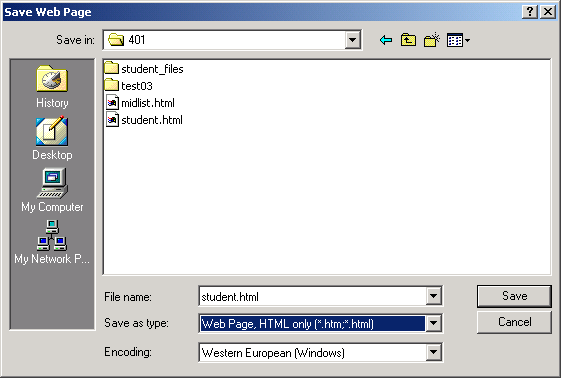
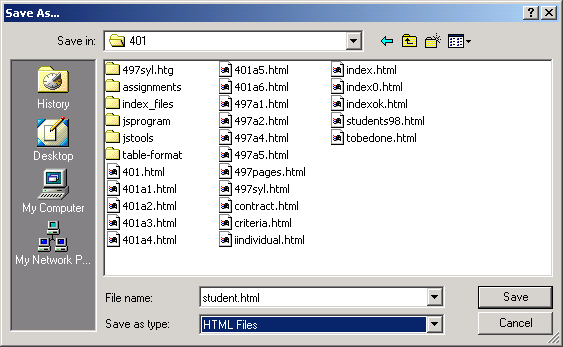
- Select File, Save as and save the file student.html in your UB network account or in your home/office PC. Notes:
- Netscape 6, 7, Mozilla, Internet Explorer: do as shown in this image.
- Netscape 4: do as shown in this other image.
- create a profile for HOME, home.ubalt.edu , in WS_FTP, if you have not yet done so (see the telnet and FTP tutorial).
- Ftp the file student.html to your UBxxXxx directory in the home.ubalt.edu Server. Note: select students and then look for your account.
- send me an e-mail with the URL (address) of the student.html page in your UBMAIL account. It will have the following format: http://home.ubalt.edu/students/UBxxXxx/student.html , where UBxxXxx is your account in HOME. For example my account is abento.
- use 401a1 as subject of the message.
That's it folks!
This page is maintained by Al Bento who can be reached at abento@ubalt.edu
This page was last updated on August 20, 2003. Although we will attempt to keep this information accurate, we can not guarantee the accuracy of the information provided.